
OCI Compartments: the decision you make before you have anything to decide about
Compartments look like folders. They are not. They are the boundary your access policies, your billing and your blast radius all inherit from — and you have to draw them on day one, before there is a single resource to put in them.
From racks to compartments
In the data centre, separation was physical. An application sat in its own rack, a department had its own row, and the boundary was something you could walk up to and touch. Virtualisation moved that boundary into software — zones, resource pools, clusters — but the hypervisor underneath was still yours alone.
Public cloud removes that last assumption. In Oracle Cloud Infrastructure the tenancy is the boundary between you and every other customer. What it does not give you is the boundary between your own business units, applications and environments. That is what compartments are for.
Oracle's own definition is worth reading slowly, because it packs three separate jobs into one sentence:
Compartments are a fundamental component of Oracle Cloud Infrastructure for organizing and isolating your cloud resources. You use them to clearly separate resources for the purposes of measuring usage and billing, access (through the use of policies), and isolation (separating the resources for one project or business unit from another).
Billing. Access. Isolation. In practice most teams design for the first, discover the second three months in, and only think hard about the third after an incident.
What a compartment actually is
A few properties shape every design decision that follows:
Tenancy-wide and available across all regions. A compartment is not a regional construct. Create it once and it exists everywhere your tenancy is subscribed.
Named, with rules. Up to 100 characters — letters, numbers, periods, hyphens and underscores — and unique within its parent compartment.
Identified by an OCID. Oracle assigns every compartment a unique Oracle Cloud Identifier at creation. That OCID is what your policies, your Terraform state and your automation actually reference — not the name.
Nestable up to six levels deep.
The unit the console navigates by. Every resource list in the OCI console is filtered by compartment. Your compartment structure is not a back-office taxonomy; it is the interface your engineers use every single day.
“You can move it later” is technically true
This is the line that lets teams skip the design conversation, so it is worth taking apart.
Oracle states that most resources can be moved between compartments after creation. The word doing the work is “most.” What the documentation also says:
Some resources cannot be moved at all. The behaviour is per-service, and you have to check the service documentation for each one.
Attached dependencies behave inconsistently. For some resources the attachments move with the parent — asynchronously, and invisible in the new compartment until the move completes. For others they do not move at all and have to be moved separately.
New policies apply immediately. The moment a resource lands in a compartment, that compartment's policies govern access to it. Whatever was permitted a second ago may not be now.
Metering, billing and alarms can be affected. Depending on how your structure is organised, you can break the continuity of your own cost reporting.
Moving a compartment needs manage all-resources on the lowest shared parent of source and destination — a permission most people with day-to-day access do not have, and should not have.
Security zones will block a move that would place a resource somewhere less secure than where it started.
None of that makes moving impossible. It does mean a move is a small migration with a change window, not a drag-and-drop. Design it properly the first time and you never have to find out which of your resources are in the “cannot move” category.
The four axes
Every workable compartment structure I have seen is an ordering of the same four things:
Business Unit · Application · Environment · Service
The interesting question is never which of these you use. It is what order you put them in — because the top level is the hardest thing to change later, and it is what your access policies and your cost reports hang off.
Three patterns
Pattern 1 — Business Unit first. The right default when one tenancy serves several business units and someone is going to ask for a cost breakdown by business unit. It is also the deepest, which is its cost.
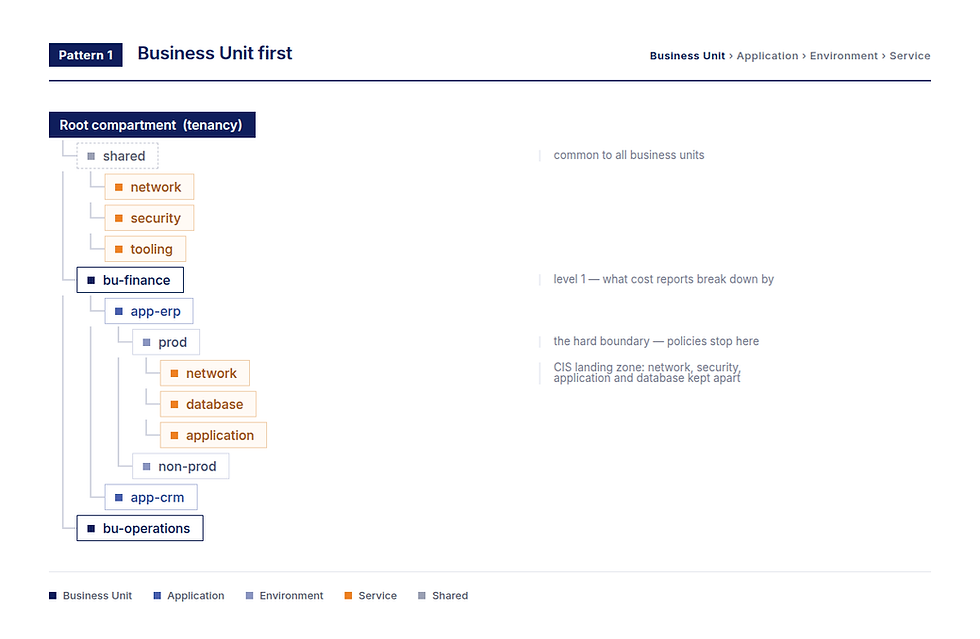
Pattern 1 — Business Unit › Application › Environment › Service, with one shared compartment common to all business units.
Pattern 2 — Service first. Suits estates where platform teams own a service horizontally — the network team owns networking everywhere, the database team owns databases everywhere — and access is granted along those lines rather than by application.
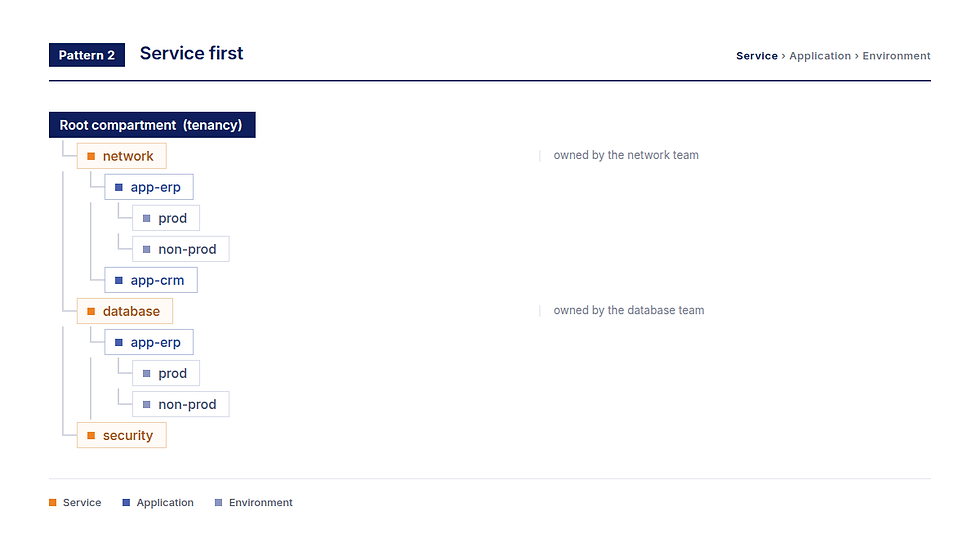
Pattern 2 — Service › Application › Environment, for estates where platform teams own a service across every application.
Pattern 3 — Application first. The simplest structure that still works. A single business unit, a manageable number of applications, and prod/non-prod as the hard boundary underneath each.

Pattern 3 — Application › Environment › Service, with the root compartment doing the job of the business unit level.
A note on the root compartment: if the tenancy is only ever going to serve one business unit, do not create a business unit level. The root compartment is your business unit. An extra level that never branches is pure overhead in every policy statement you write from then on.
Where the shared services go
In Pattern 1 I keep a single shared compartment common to all business units — shared networking, shared tooling, shared images. If your business units genuinely do not share infrastructure, put the shared compartment underneath each business unit instead. That choice tells you something useful about whether you have one platform or several.
The CIS OCI Landing Zone benchmark recommends separate compartments for network, security, application and database resources. Worth reading before you settle your structure, particularly in a regulated environment where you will eventually have to show your separation-of-duties story to someone.
Stop at four levels
Six is the ceiling, not the target. Four is deep enough for everything above, and every level past it costs you: longer policy statements, more clicks before an engineer sees the resource they came for, and a structure nobody can hold in their head — which in the end is how shadow resources accumulate in the root compartment.
The short version
Design the structure before you deploy anything. Pick the ordering that matches how your organisation actually grants access and reports cost, not how the org chart happens to look this quarter. Keep it to four levels or fewer. And treat “we can move it later” as a fallback, not a plan.

Comments